Overview (what XML upload is)
SciENcv supports Data Ingest (XML file upload) to help users pre-populate CPOS entries in the SciENcv interface.
XML upload is a data-entry accelerator, not a submission bypass. NIH still requires a SciENcv-generated, digitally certified PDF, and the individual (not a delegate) must certify.
A file can still be a valid upload file even when some fields are blank. After upload, SciENcv will flag missing required values in the UI with red exclamation icons that must be resolved before certification/download.
NIH says SciENcv/eRA updates deployed on April 22, 2026 allow zero person-month effort for Proposals/Active Projects and In-Kind Contributions when applicable. Older 2025-1 SciENcv CPOS PDFs that do not support zero effort continue to function for eRA submission, but new or updated documents can use the 2026-1 behavior.
The CPOS form displays dates in a human-facing month/year style, but the XML upload template uses machine-readable
YYYY-MM-DD. If you only know month/year, use day01consistently and confirm the rendered entry in SciENcv after upload.
Where to find XML upload in SciENcv
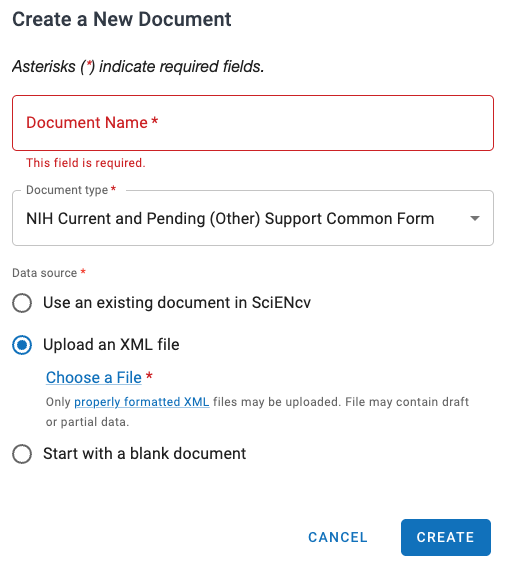
Use Create New Document → Current and Pending (Other) Support (CPOS) Common Form to access the XML upload flow.
flowchart LR
    accTitle: CPOS XML upload review loop
    accDescr: XML upload starts with a simple upload file, then SciENcv imports data, flags missing values, and requires UI review before certification.
    A["CPOS XML upload file"] --> B["SciENcv Data Ingest"]
    B --> C["Entries pre-populated"]
    C --> D{"Red exclamation icons?"}
    D -- "Yes" --> E["Complete missing values in UI"]
    D -- "No" --> F["Review rendered entries"]
    E --> F
    F --> G["Ready for individual certification"]
Two upload rules that commonly break files
<contributiontype>must be present and non-empty. Useawardfor proposals/active projects andinkindfor in-kind contributions.- In
<commitment>, each<personmonth>must include ayear="YYYY"attribute even if the value is blank.
Element reference (simple upload template)
Use this quick reference for the CPOS upload fields and limits.
classDiagram
    Profile *-- Identification
    Profile *-- Employment
    Profile *-- Funding
    Identification *-- Name
    Employment *-- Position
    Funding *-- Support
    Support *-- Commitment
    Commitment *-- PersonMonth
    class Profile
    class Identification
    class Name
    class Employment
    class Position
    class Funding
    class Support
    class Commitment
    class PersonMonth
| Element | Description | Type / limits |
|---|---|---|
| firstname | User first name (in <name>) | String (no max limit) |
| middlename | User middle name (in <name>) | String (no max limit) |
| lastname | User family name (in <name>) | String (no max limit) |
| positiontitle | Position title | String (no max limit) |
| orgname | Organization name | String (no max limit) |
| city | City of organization | String (no max limit) |
| stateorprovince | State or province | String (no max limit) |
| country | Country | String (no max limit) |
| startdate/year | Employment start year in <startdate><year>YYYY</year></startdate> | YYYY |
| enddate/year | Employment end year in <enddate><year>YYYY</year></enddate> | YYYY |
| projecttitle | Proposals and active projects title | String, 300 chars max |
| awardnumber | Proposals and active award number | String, 50 chars max |
| supportsource | Source of support | String, 60 chars max |
| location | Primary place of performance | String, 60 chars max |
| contributiontype | Used to route to award vs in-kind | award or inkind (required) |
| awardamount | US Dollar value of award amount | Integer, 13 digits max |
| inkinddescription | Summary of in-kind contribution | String, 500 chars max |
| overallobjectives | Overall objectives | String, 1500 chars max |
| potentialoverlap | Statement of potential overlap | String, 5000 chars max |
| startdate | Project start date | YYYY-MM-DD |
| enddate | Project end date | YYYY-MM-DD |
| supporttype | Status of support | current or pending |
| personmonth | Person-months per year in <commitment> | <personmonth year="YYYY">value</personmonth>; 0 is allowed when applicable |
Character restrictions
Escape reserved XML characters in element text:
&->&<-><>->>
Next: